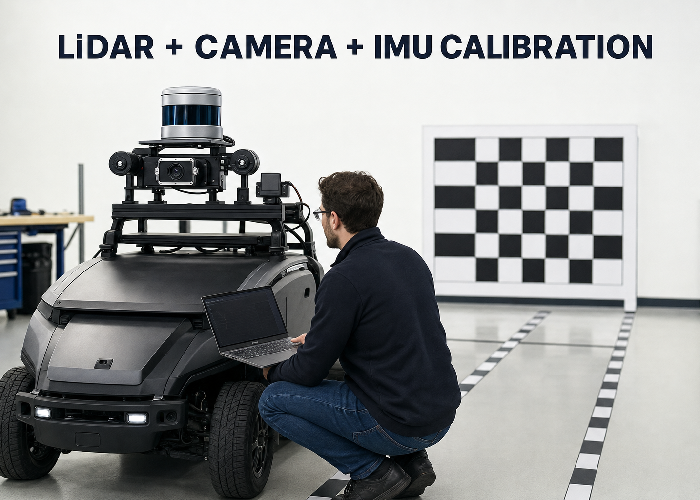
LiDAR camera IMU calibration is often described as finding a few transformation matrices. In a real robot or vehicle, the harder job is proving that three sensors observed the same event at the same time, from rigidly known positions, and that the saved transforms still describe the hardware after the machine leaves the workshop.
A calibration can look convincing in one screenshot and still fail on the road. A small yaw error makes projected LiDAR points drift sideways with distance. A timestamp offset makes the overlay separate whenever the platform turns. A flexible bracket makes yesterday’s result irrelevant. The workflow below is designed to catch those practical errors before they become perception bugs.
The sequence is straightforward: define frames and timing, secure the hardware, calibrate camera intrinsics, collect geometrically useful data, estimate LiDAR-camera and LiDAR-IMU extrinsics, then validate on scenes that were not used to solve the calibration. This approach fits a single research robot as well as a repeatable autonomous-driving LiDAR integration process.
Write the sensor contract before collecting data
List every sensor topic, message type, frame ID, nominal rate, clock source and physical connector. For a 3D LiDAR, record whether the point cloud timestamp represents the first point, last point or packet interval. For the camera, record exposure timing and whether images are hardware-triggered. For the IMU, record rate, axis convention, units and whether orientation is measured or estimated.
The ROS PointCloud2 definition places acquisition time and coordinate frame in the message header, while the Imu message definition distinguishes orientation, angular velocity and linear acceleration with covariance fields. Those fields are not paperwork. They are the data contract a calibration tool and downstream estimator rely on.
Make one diagram showing the base frame and each sensor frame. Use the ROS coordinate-frame conventions consistently, but confirm each device driver’s actual axis orientation rather than assuming the label is correct. A ninety-degree axis mistake can still produce a mathematically valid transform that is physically nonsense.
Mechanical rigidity comes before mathematics
Power the platform down and inspect the sensor structure. The LiDAR, camera and IMU should be mounted to a rigid common structure or to structures whose relative motion is negligible for the application. Thin sheet metal, long unsupported arms, rubber isolation and adjustable camera joints can all move under vibration or temperature. Calibration cannot compensate for a transform that changes during operation.
Use suitable fasteners, locking methods and cable strain relief. Mark the final bracket positions so a later inspection can reveal movement. Photograph the rig from several angles and record torque values when the mechanical design requires them. Keep service access in mind: replacing a camera should not force the LiDAR bracket out of position unless the maintenance procedure includes recalibration.
The IMU deserves special attention because its sensing axes may sit inside a small enclosure with no obvious external reference. Record the vendor axis drawing and the installed orientation. Mount it away from loose panels and strong vibration sources where practical. If an isolation mount is needed, verify that it does not introduce relative motion that conflicts with the LiDAR-IMU model.
Calibrate the camera by itself first
LiDAR-camera extrinsic calibration assumes the camera’s intrinsic model is already credible. Calibrate focal parameters and distortion using the production resolution, lens focus and image pipeline. Cover the full image with the target at varied positions and tilts rather than collecting many nearly identical front-facing views. Reject blurred frames and frames where the target is too small for stable corner localization.
After solving, inspect reprojection error but do not stop at one average number. Look at error across the image, especially corners. Straight structural lines should remain straight after rectification. Save the exact intrinsic file with resolution, date, lens setting and camera serial or asset ID. If focus, crop, binning or resolution changes, confirm whether the calibration remains valid.
The official Autoware LiDAR-camera calibration guide explicitly requires camera intrinsic calibration before extrinsic work and shows how matched LiDAR and image points are used to estimate the transform. That ordering prevents an intrinsic distortion problem from being absorbed incorrectly into an extrinsic pose.
Choose scenes with useful geometry
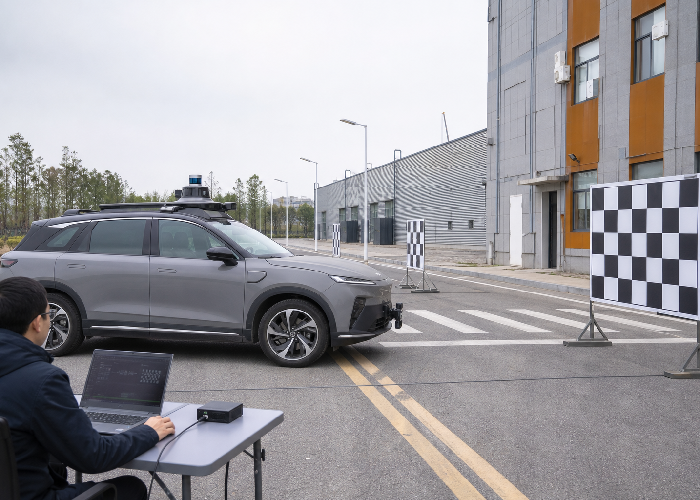
A blank wall is easy to scan but weak for a six-degree-of-freedom transform. Collect scenes with vertical planes, horizontal ground, corners, poles and edges at several depths. The LiDAR and camera must share a meaningful field of view, and the relevant features must be identifiable in both modalities. A checkerboard or purpose-built target helps, but natural structure is valuable for independent validation.
Do not fill the dataset with one pose. Move the target left, right, high and low; vary distance and orientation. If the platform itself moves, use slow controlled motion and include rotations that excite the axes needed for LiDAR-IMU calibration. Avoid crowds, moving vehicles, swaying vegetation and reflective glass during the main solve because they create correspondences that do not represent one rigid scene.
Keep exposure useful for the calibration target and surrounding structure. Overexposed checkerboard squares, motion blur or an image compressed until edges break apart can reduce correspondence quality. On the LiDAR side, retain enough raw points and intensity information to identify target boundaries without aggressive ground removal or object filtering.
| Dataset property | Good evidence | Warning sign |
|---|---|---|
| Depth variation | Features near, middle and far | All points lie on one wall |
| Orientation | Several target tilts and platform turns | Repeated front-facing frames |
| Motion | Slow, measured and timestamped | Fast turns with unknown delay |
| Scene stability | Static walls, poles and targets | People crossing correspondences |
| Image quality | Sharp corners across the frame | Blur, clipping or changed focus |
| Point-cloud quality | Raw geometry retained | Heavy filtering before calibration |
Time alignment is part of calibration
Suppose a vehicle turns at a modest yaw rate while the camera is delayed by 80 milliseconds relative to the LiDAR. The spatial overlay will show a lateral error that grows with scene depth, even if the physical extrinsic transform is correct. If the error appears mainly during motion and collapses when stationary, investigate timing before repeatedly solving the transform.
Prefer hardware synchronization or a shared time source when the application demands it. If software timestamps are used, measure transport and buffering behavior. Record system load, network path and message queues during collection. A timestamp placed after image processing is not equivalent to the exposure time, and a point cloud assembled over a scan interval is not a single instantaneous measurement.
Plot sensor timestamps and inter-message intervals. Look for constant offsets, drift, jumps and dropped samples. Then perform a simple dynamic check: rotate the platform past a strong vertical edge and compare when that edge crosses the camera and point-cloud views. This does not replace formal estimation, but it quickly reveals whether timing is large enough to corrupt the spatial solve.
Solve LiDAR-camera extrinsics, then challenge them
Use the selected tool to estimate rotation and translation from matched features or target observations. Start from a physically reasonable initial transform when the tool expects one. Review residuals and correspondence quality, remove clearly incorrect matches for documented reasons, and rerun. Do not keep deleting difficult points merely to make the summary error smaller.
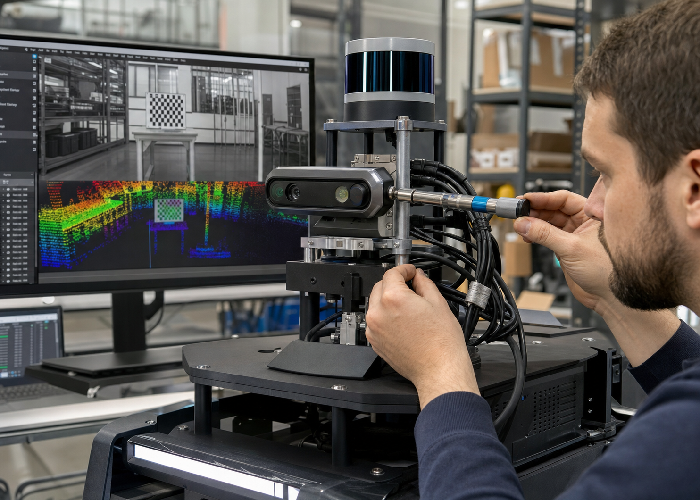
Project the LiDAR points onto several images that were not included in calibration. Check near and far vertical edges, the ground boundary, poles and target corners. A good overlay should remain consistent across the image and across depth. If near objects align but far edges drift, inspect angular error. If one side aligns and the other does not, inspect camera intrinsics and target coverage.
The calibration video below demonstrates a related multi-sensor workflow. Use it as a visual companion, but keep your own frame conventions, timestamps and acceptance criteria in control.
LiDAR-IMU calibration needs motion that excites the system
LiDAR-IMU calibration estimates the rigid relationship between the point sensor and inertial axes, often together with temporal effects or bias terms. A dataset of straight, constant-speed driving provides weak information about some rotations. Include safe, smooth turns in both directions and changes in acceleration, while keeping enough static structure for LiDAR odometry or scan matching.
Begin with an IMU intrinsic check: stationary bias, noise, axis signs and gravity magnitude. Warm-up behavior matters. Record a stationary segment before and after motion so drift and bias changes are visible. Secure the platform during static collection; a desk that is being bumped is not a stationary reference simply because the wheels are stopped.
The Autoware LiDAR-IMU calibration documentation provides a concrete integration reference. Regardless of tool, save the input bag, configuration, initial guess, output transform and logs together. Without those files, a numerical result cannot be audited or reproduced after the hardware changes.
A practical two-day workshop scenario
Imagine a warehouse robot with a roof LiDAR, a forward camera and an IMU inside the compute enclosure. On day one, the team calibrates indoors and gets an attractive overlay on the checkerboard. During a fast aisle turn, however, projected points slide across rack uprights. When the robot stops, they align again. That pattern points toward timing or motion compensation, not a simple fixed yaw error.
The team logs a slow rotation past a doorway and finds the camera frames lag the point cloud. After correcting timestamp handling, the moving overlay improves. A smaller residual remains on the right edge of the image, leading them back to camera intrinsics; most original calibration images had placed the board near the center. A new intrinsic dataset with corner coverage removes that bias.
On day two, the robot runs over a floor joint and the overlay shifts briefly. Inspection finds that the camera bracket flexes while the LiDAR mount remains rigid. Tightening software thresholds would only hide the symptom. Replacing the bracket and repeating the short validation sequence fixes the physical cause and produces a result that survives motion.
Validate the whole stack, not one overlay
Create a validation route with structures at several depths and orientations. Save raw sensor data and the fused output. Inspect static alignment, slow turns, acceleration, braking and ordinary vibration. If the application includes temperature changes, repeat after warm-up and at relevant environmental limits. Calibration acceptance should include the operating envelope, not just the room where the solve was performed.
Measure task-level impact. For projection, sample pixel distance between LiDAR edges and image edges across zones. For localization, compare trajectory consistency and map alignment. For object fusion, inspect whether camera detections and LiDAR clusters associate correctly near field-of-view boundaries. The acceptable error depends on object size, range and the downstream decision.
Use robotics LiDAR deployment guidance to connect these measurements to the machine’s actual work. A calibration that is sufficient for broad visualization may be insufficient for identifying a narrow pallet fork, estimating a curb edge or associating a distant pedestrian.
Configuration and handoff
Store transforms in one controlled source of truth. Record translation units, quaternion order, parent and child frames, solver version and date. Avoid copying rounded values through spreadsheets and launch files. A few lost decimal places may be harmless for one transform and damaging for another; the better rule is to preserve the solver output and generate deployment files from it.
Include a five-minute health check that another engineer can run. It might place the platform at a marked location, view a pole and checkerboard, verify stationary IMU output, and compare an overlay against saved reference images. Run this check after sensor replacement, bracket work, impacts, firmware changes or unexplained perception drift.
When selecting hardware from the 3D LiDAR sensor range, ask about timestamp definition, synchronization inputs, driver frame conventions, calibration files and mechanical datums. Those details can reduce integration time more than another polished visualization. For project-specific support, share the frame diagram and timing plan through the LiDAR integration request.
Turn one successful calibration into a repeatable build process
A prototype can be calibrated with hand-selected points and several hours of expert attention. A fleet needs controlled mechanical datums, named configuration files and an acceptance sequence that produces comparable evidence for every unit. Define where targets stand, how long sensors warm up, which motion is driven, which software version runs and where results are stored. The process should identify a failed unit without relying on the person who developed the first vehicle.
Use a golden platform only as a reference, not as proof that every build is identical. Compare bracket dimensions, cable routing, sensor orientation and timing diagnostics across units. Small manufacturing differences may be acceptable, but each unit needs its own verified transform unless the mechanical design and error budget justify transferring calibration. If transforms are transferred, sample enough vehicles to demonstrate that the production tolerances support the decision.
Track calibration history by hardware identity. A replacement camera can share the same housing while having different intrinsics; a replaced IMU can have different bias behavior; a remounted LiDAR can return to a visually similar but measurably different pose. Link the active files to the installed assets so maintenance cannot accidentally deploy an old transform after a swap.
Set warning limits from task impact rather than solver convenience. For example, determine how much angular error moves a projected point at the farthest association distance, or how much timing error is tolerable at the maximum turn rate. These calculations turn an abstract residual into a pass band that engineers, manufacturing and service teams can understand.
Keep one deliberately miscalibrated dataset for training and regression tests. A small known yaw offset, timing shift or frame error gives future engineers a recognizable failure signature. It also confirms that automated health checks actually reject bad calibration instead of passing every dataset that reaches the end of the script.
FAQ
What is the difference between intrinsic and extrinsic calibration?
Camera intrinsics describe the lens and image geometry inside one camera. Extrinsics describe the rigid rotation and translation between sensor coordinate frames.
Should LiDAR-camera or LiDAR-IMU calibration come first?
There is no universal order for every toolchain, but camera intrinsics and basic IMU checks should be established first. Then follow the dependency and data requirements of the selected extrinsic tools.
How can I tell timing error from spatial error?
Compare static and moving scenes. A fixed spatial error remains when stationary, while timing-related misalignment often grows with angular or linear motion and changes direction when motion reverses.
How often should sensors be recalibrated?
Use event-based checks after mounting changes, impacts, sensor replacement or unexplained drift, plus a scheduled health check appropriate to the application’s vibration and maintenance conditions.
Is a low solver residual enough?
No. Validate on unused scenes, varied depths, motion and task-level outputs. A solver can fit a weak or biased dataset and still report a small residual.
What files should be kept?
Keep raw bags, intrinsic files, initial guesses, solver settings, output transforms, logs, validation captures, hardware photos and version information.
Conclusion
For a later-stage project review, compare the article guidance with LiDAR sensor product families, then keep the measurement assumptions close to neutral LiDAR technology overview and NIST laser scanner ranging tests. This keeps LiDAR Camera IMU Calibration: A Practical Workflow That Catches Real Errors tied to repeatable evidence rather than a single attractive demonstration.
When the application involves robots, vehicles, or moving equipment, review robotics LiDAR applications and OSHA robotics safety overview together. For teams using ROS data, ROS 2 LaserScan message definition and ROS PointCloud2 message definition are useful references for checking whether the output format matches the software contract.
Before the final shortlist, compare the physical environment against industrial automation LiDAR deployments. If timing, frames, or collision behavior matter, save notes beside ROS 2 tf2 transform documentation and Nav2 collision monitor documentation so another engineer can repeat the same check later.
For purchasing or scaling decisions, connect the final requirement back to request a LiDAR application recommendation. Safety, compliance, and training notes can be checked against ISO 3691-4 driverless industrial truck safety standard, while the supporting video reference related LiDAR application video gives the team a quick visual reminder of practical LiDAR behavior.
For outdoor, public, or high-reflectivity scenes, keep NIST laser scanner calibration experiments, NOAA LiDAR measurement overview, and FDA laser product safety information with the project notes. Those references help the next reviewer understand calibration, measurement context, and laser-safety assumptions.
LiDAR camera IMU calibration becomes dependable when mechanics, clocks, coordinate frames and validation receive the same attention as the solver. Build the sensor contract, collect varied static geometry and useful motion, verify on unseen scenes, and preserve a repeatable health check. The result is not merely a transform file; it is evidence that the multi-sensor system still describes one physical world.