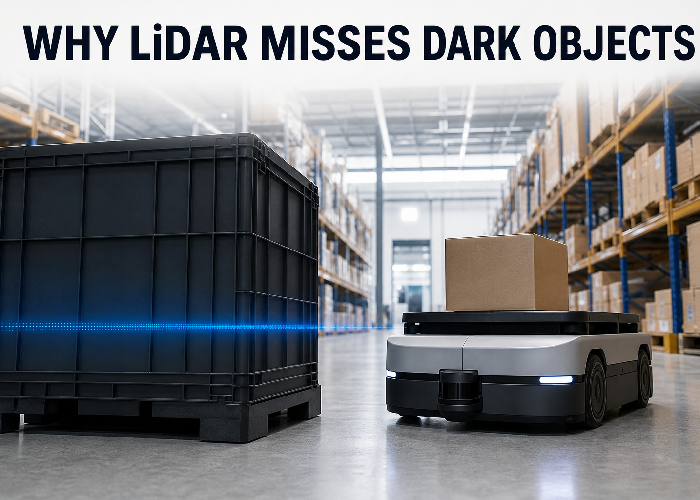
LiDAR black object detection problems rarely begin with a completely invisible obstacle. More often, a dark tote looks solid at three metres, becomes patchy at six, and disappears for a few scan angles when the robot turns. That distinction matters. It tells you the sensor is not simply “good” or “bad”; the return margin is changing with distance, material, angle, mounting and processing.
The practical answer is to stop treating black as a color label and start treating it as a test condition. A dark object may return less optical energy, but color alone does not predict everything. Surface finish, wavelength, incidence angle, beam footprint, contamination and receiver thresholds all change what reaches the detector. The job is to reproduce the weak-return combination that exists on your route, then decide whether the result is still usable.
This guide follows the way I would investigate the issue on an actual mobile robot: preserve raw evidence, build a small target set, change one variable at a time, and verify the machine response rather than admiring a clean visualization. The same method also helps when selecting from a broader LiDAR sensor catalog.
Start with the return path, not the color name
A time-of-flight LiDAR emits light and estimates distance from the returned signal. The target must send enough light back toward the receiver for a valid measurement to survive detection and filtering. A matte-black surface often absorbs more of the emitted wavelength than a pale diffuse surface, so the return can approach the sensor’s detection threshold sooner. The neutral concept behind this is reflectance: the fraction and direction of reflected optical energy depend on wavelength and material.
The return path contains several losses. Beam energy spreads with distance. Only part of the spot lands on a small object. A sloped surface redirects much of the reflection away from the receiver. Dust or a scratched window adds loss. Bright ambient light raises the background the receiver must work against. The final signal is therefore the product of several ordinary effects, which is why a dark object at a square angle can be easier than a gray object seen at a grazing angle.
Do not use the intensity value as if it were a calibrated color meter. In the ROS LaserScan message definition, intensity is explicitly device-specific. It can be useful within one sensor and configuration, but a value of 40 on one device does not necessarily mean the same thing on another. Treat intensity as supporting evidence beside valid-return rate, range stability and actual obstacle behavior.
What a weak return looks like in real data
A weak target can fail in several ways. You may see no range for a few adjacent rays, a shorter maximum detection distance, range values that jump between the object and the wall behind it, or a thin obstacle that appears only when it occupies several angular samples. Some drivers encode invalid points as infinity; others publish no return or a value outside the configured range. Before diagnosing hardware, confirm exactly how your driver represents invalid data.
Save a short raw scan while the object is stationary. Plot range and intensity against angle, and keep the timestamps. Then repeat while the robot moves toward the object at a slow fixed speed. This separates an optical weakness from a timing or motion problem. If the stationary scan is stable but the moving system reacts late, inspect scan frequency, transport delay, filtering and controller update timing before changing the sensor.
The NIST laser-scanner calibration study is useful because it tested distance, target color and incidence angle rather than assuming one factor explained everything. Its results showed less-reflective targets becoming less precise at longer distance and accumulating more misses as incidence angle increased. The report also warns that results were instrument-dependent, which is exactly why a project needs its own acceptance test.
Build a target set that resembles the route
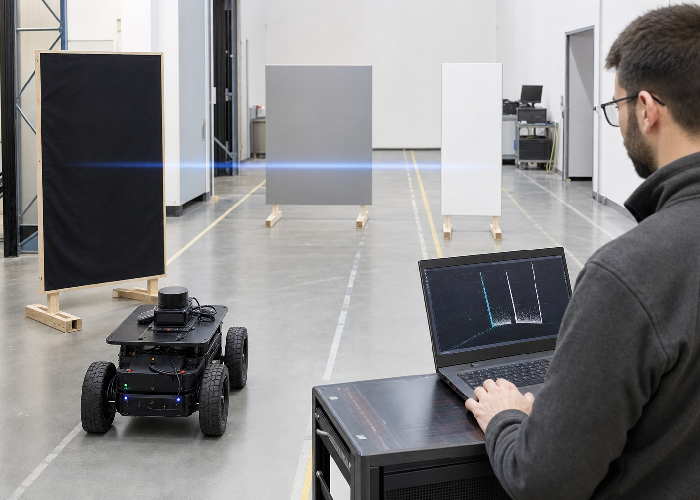
A useful target set is not a row of small paper squares. Start with objects the robot may actually meet: a matte-black tote, a dark curtain, a tire sidewall, black workwear on a soft pedestrian dummy, a dark pallet edge and a low rubber chock. Add medium-gray and white controls of similar size and shape. The controls reveal whether a change affects all targets or mainly the low-return group.
Make each target large enough to intersect several rays at the distances you care about, then add a smaller target to probe the limit. Record width, height, surface material and orientation. If you change from fabric to painted metal halfway through the test, note it. The goal is not laboratory perfection; it is enough discipline that another engineer can repeat the test and understand why the result changed.
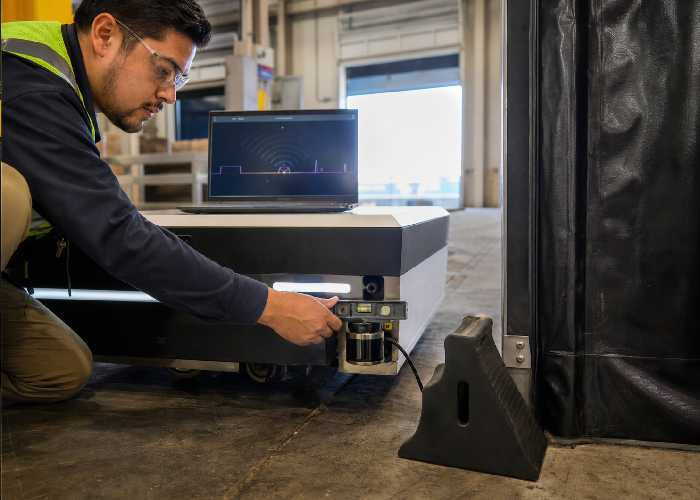
Use the planned robotics LiDAR application and scan height. A floor-level chock can sit below a scanner mounted for adult leg detection. A hanging curtain can pass above a scanner mounted too low. These are geometry failures, not dark-object failures, and no amount of intensity filtering can recover an object the scan plane never intersects.
| Test variable | Why it matters | What to record |
|---|---|---|
| Distance | Return margin and beam footprint change | Valid-return rate and range spread |
| Target angle | Specular and diffuse energy leave in different directions | 0°, 15°, 30°, 45° results |
| Object size | A small target may occupy too few samples | Visible angular width |
| Robot speed | Available reaction time shrinks | First detection and stop position |
| Window condition | Dust and film reduce optical margin | Clean/dirty comparison |
| Lighting | Ambient background can affect receiver margin | Indoor, doorway and direct-sun runs |
Change one variable at a time
Place the black, gray and white targets at the same measured distance and normal to the sensor. Capture at least several seconds of stationary data for each. Move the targets outward in consistent steps until the route’s required detection distance is covered. Next, return to a known distance and rotate each target through a small set of angles. Only after those baselines should you add movement, glare, vibration or contamination.
This sequence protects you from an easy mistake: changing distance, angle and speed together, then blaming the darkest object. If returns collapse only when the target rotates, the practical fix may be overlapping coverage or a different mounting position. If all targets weaken after the sensor window is misted, maintenance and contamination detection deserve more attention than material color.
NIST’s ranging tests for laser scanners describe measurement against non-cooperative targets and emphasize known geometry and traceable distance. A warehouse pilot does not need a national metrology facility, but it benefits from the same habit: know where the target is, keep the setup stable, and save enough evidence to distinguish a missed return from an incorrect reference.
Mounting height can solve or create the problem
Move a flashlight across a black tote and you can see how ribs, lips and recessed panels change the reflection. A scan plane that crosses a broad matte panel may produce a different pattern from one crossing a glossy rim. During commissioning, inspect the real intersection line around the full route. Door thresholds, ramps, payload sag and tire compression can shift that line by enough to change which surface the sensor sees.
For a low mobile robot, a second scan height or a carefully positioned short-range sensor may cover objects that the navigation scanner misses. That does not mean adding sensors blindly. Draw the expected coverage, include the vehicle body and payload, and identify occlusion caused by forks, bumpers or carried goods. Use industrial automation LiDAR planning to frame this as a machine-coverage problem rather than a single specification comparison.
Keep the bracket rigid and serviceable. A mount that drifts a few degrees can move the scan plane above a small obstacle several metres away. Add a simple reference mark, record the installation angle, and include a quick alignment check after impacts or maintenance. If a technician cannot reach the window without disturbing the bracket, cleaning will eventually become a calibration event.
Filtering helps only after you understand the raw scan
Median filters, temporal persistence and clustering can suppress isolated noise, but they can also erase the first weak points from a dark target. Begin with the rawest output available. Compare the unfiltered scan with each processing stage and document what is removed. A filter should solve a named failure mode, such as single-frame atmospheric returns, without silently widening the blind area around low-reflectivity objects.
Avoid a rule that says “low intensity equals invalid.” Intensity can vary with range and angle even for a real object, and highly reflective objects can create their own errors or saturation behavior. Better logic checks spatial consistency, persistence, expected object size, motion and agreement with another sensor. A weak but geometrically plausible cluster may deserve a cautious slowdown instead of immediate deletion.
Watch this practical ROS LiDAR installation video, then compare its frame and visualization checks with your own setup. The important lesson is not a particular package; it is confirming that the physical scanner, coordinate frame and software view describe the same scene.
Use fusion as coverage, not as an excuse
A bumper, depth camera or ultrasonic sensor can provide complementary close-range evidence, especially below the LiDAR scan plane. Fusion is valuable when each sensor’s role is explicit. For example, the 2D LiDAR may provide aisle geometry and early obstacle detection, while a short-range sensor protects the final half metre around a docking maneuver. The controller should know how to respond when the sources disagree.
Do not hide a weak LiDAR configuration behind a second sensor and declare the problem solved. Test each input separately, then test the combined decision. Disconnect or mask one sensor during controlled trials so you can prove the fallback works. The broader LiDAR sensing solutions should be judged by machine behavior under degraded inputs, not by the number of devices on the drawing.
For applications with personnel exposure, separate navigation obstacle detection from any safety-rated protective function. A general-purpose scanner, custom filter and robot controller do not automatically become a certified safety system. Review the applicable machinery risk assessment, required performance level and protective-device requirements with qualified safety personnel.
A compact warehouse case
Consider an AMR that reliably sees cardboard boxes but reacts late to black reusable totes placed near an aisle corner. The first inspection finds that the scan plane strikes the tote’s recessed side panel at a shallow angle during the turn. At the same moment, the navigation filter requires three consecutive frames before accepting a new obstacle. Neither issue alone explains every miss, but together they reduce the usable reaction distance.
A sensible trial would keep the same sensor, lower and level the bracket enough to cross the tote ribs, then replay the route at reduced speed while logging raw scans. The team could compare one-, two- and three-frame persistence while measuring false stops. If the improved geometry restores stable points, aggressive filtering may no longer be necessary. Only after this trial should procurement consider different hardware.
The acceptance result should be written as behavior: the robot detects the specified tote orientations before a marked point, enters a controlled slowdown, and stops with the required clearance. “The tote looks better in the point cloud” is an observation, not an acceptance criterion.
Keep a field record that survives the pilot
Create one page for every test configuration. Include a photograph from the sensor’s viewpoint, the measured target distance, target angle, scan height, robot speed, window condition, lighting and software configuration. Name the matching log file on that page. This small discipline prevents a familiar problem a month later: several point clouds remain, but nobody remembers which one used the lowered bracket or the clean window.
Record misses as carefully as successes. Note whether the target produced no points, intermittent points, unstable range or points that a later filter removed. Also mark false stops caused by floor edges, reflective wrap or nearby structures. Improving dark-object sensitivity by making the robot stop for harmless clutter is not a complete solution; the acceptance review needs both sides of the tradeoff.
After the setup passes, repeat a short reference test at the start of each commissioning day and after any bracket work. Use the same dark tote, distance marks and robot approach. A five-minute comparison can reveal a shifted mount, changed firmware setting or contaminated window before the team spends hours debugging route behavior. Keep this reference target with the service kit if dark reusable containers are common at the site.
Buying questions that expose low-return risk
Ask for detection information at stated target reflectivity, not only maximum range against a favorable target. Confirm the wavelength, minimum and maximum range, angular increment, scan rate, intensity availability, multi-echo behavior, outdoor-light conditions, window material and driver output. Then ask which of those values change with operating mode. A comparison is useful only when the conditions behind the numbers are visible.
Bring your target set to the evaluation. If that is impossible, send dimensions, material photos, mounting limits and route distances, then request raw or minimally processed samples. For a project-specific shortlist, the LiDAR sensor recommendation request is more useful when it includes the darkest target, smallest target, approach speed and required stopping distance.
Laser product safety is a separate check from detection performance. Review the supplier’s classification and installation guidance and use the FDA overview of laser products and instruments as neutral background. Do not modify optical output or remove protective parts to chase a stronger return.
FAQ
Can LiDAR detect black objects?
Yes, many LiDAR systems detect dark objects within suitable distances and angles. The usable margin can be lower, so validation should include the actual material, size, orientation, mounting and lighting expected in service.
Is black color always the main cause of a missed return?
No. Grazing angle, small target size, scan height, contamination, bright background, range limits and filtering can produce the same symptom. Change one variable at a time before assigning the cause.
Should I reject every low-intensity point?
Usually not. Intensity is device-specific and changes with range and geometry. Combine it with spatial consistency, persistence and application context rather than using a universal cutoff.
Will a higher scan rate fix dark-object detection?
A higher rate can improve reaction timing, but it does not automatically increase optical return strength. Confirm whether the failure is missing data, delayed processing or insufficient stopping distance.
What is the quickest useful field test?
Place real black, gray and white targets at the required detection distance and scan height. Record raw ranges while changing target angle, then repeat at operating speed and measure the machine response.
When should another sensor be added?
Add complementary sensing when the geometry or failure consequences justify overlapping coverage, especially for close-range or out-of-plane obstacles. Define and test the response when sensors disagree.
Conclusion
For a later-stage project review, compare the article guidance with LiDAR sensor product families, then keep the measurement assumptions close to neutral LiDAR technology overview and NIST laser scanner ranging tests. This keeps Why LiDAR Struggles With Black Objects: A Practical Detection Guide tied to repeatable evidence rather than a single attractive demonstration.
When the application involves robots, vehicles, or moving equipment, review robotics LiDAR applications and OSHA robotics safety overview together. For teams using ROS data, ROS 2 LaserScan message definition and ROS PointCloud2 message definition are useful references for checking whether the output format matches the software contract.
Before the final shortlist, compare the physical environment against industrial automation LiDAR deployments. If timing, frames, or collision behavior matter, save notes beside ROS 2 tf2 transform documentation and Nav2 collision monitor documentation so another engineer can repeat the same check later.
For purchasing or scaling decisions, connect the final requirement back to request a LiDAR application recommendation. Safety, compliance, and training notes can be checked against ISO 3691-4 driverless industrial truck safety standard, while the supporting video reference related LiDAR application video gives the team a quick visual reminder of practical LiDAR behavior.
For outdoor, public, or high-reflectivity scenes, keep NIST laser scanner calibration experiments, NOAA LiDAR measurement overview, and FDA laser product safety information with the project notes. Those references help the next reviewer understand calibration, measurement context, and laser-safety assumptions.
LiDAR black object detection improves when the team treats weak returns as an engineering condition rather than a mysterious color problem. Reproduce the route, preserve raw scans, vary distance and angle deliberately, inspect mounting geometry, and verify the final stop or avoidance behavior. That work produces a defensible sensor choice and a test the site can repeat after maintenance.